

Gemini 3.1 Pro tops every benchmark, but is it good for day to day work? We tested the model across a variety of tasks and compared it to Claude Sonnet 4.6, here's what happened.

Dan Cleary
Founder
February 20, 2026
Model releases are coming so fast that it’s hard to tell what’s real progress versus incremental gains.
Google’s Gemini 3.1 Pro is a perfect example. It looks insanely good on all benchmarks (more on this later), but I’ve been playing with it for about a week and it’s been...challenging.
I tested Gemini 3.1 against Sonnet 4.6 and Opus 4.6 on some head-to-head coding tasks involving building a tower defense game, as well as some other specific UI work, and some more challenging coding tasks (rebuilding a ChatGPT clone). Here’s what happened.
My first prompt was to build a tower defense game. This is a mostly-frontend task that forces a model to juggle state, UI, rendering, and game logic at once. This is a classic test I run against models (see others here: Claude Sonnet vs Opus for Vibe Coding: 4.6 Head-to-Head)
Prompt:
Build a complete tower defense game with a fixed path where enemies spawn in waves, you earn money per kill, and you lose lives when enemies reach the end. Include at least 3 tower types (different range/damage/attack speed) with upgrades, plus a simple UI to place/sell/upgrade towers and start the next wave; keep the code clean and modular and ship a playable, balanced MVP. Include basic polish: pause/restart + on-screen stats (wave, lives, money).
I break this prompt into a checklist so it’s not just “vibes”:
- Runs immediately (no missing pieces, all in 1-shot)
- Fixed path + enemies spawn in waves
- Money per kill + lives decrease on leaks
- 3 tower types (range/damage/speed)
- Upgrades work
- UI: place/sell/upgrade towers
- Start next wave control
- Basic polish: pause/restart + on-screen stats (wave/lives/money)
- Feels like a shippable MVP
Gemini produced a playable game with a pretty simple and not impressive UI.
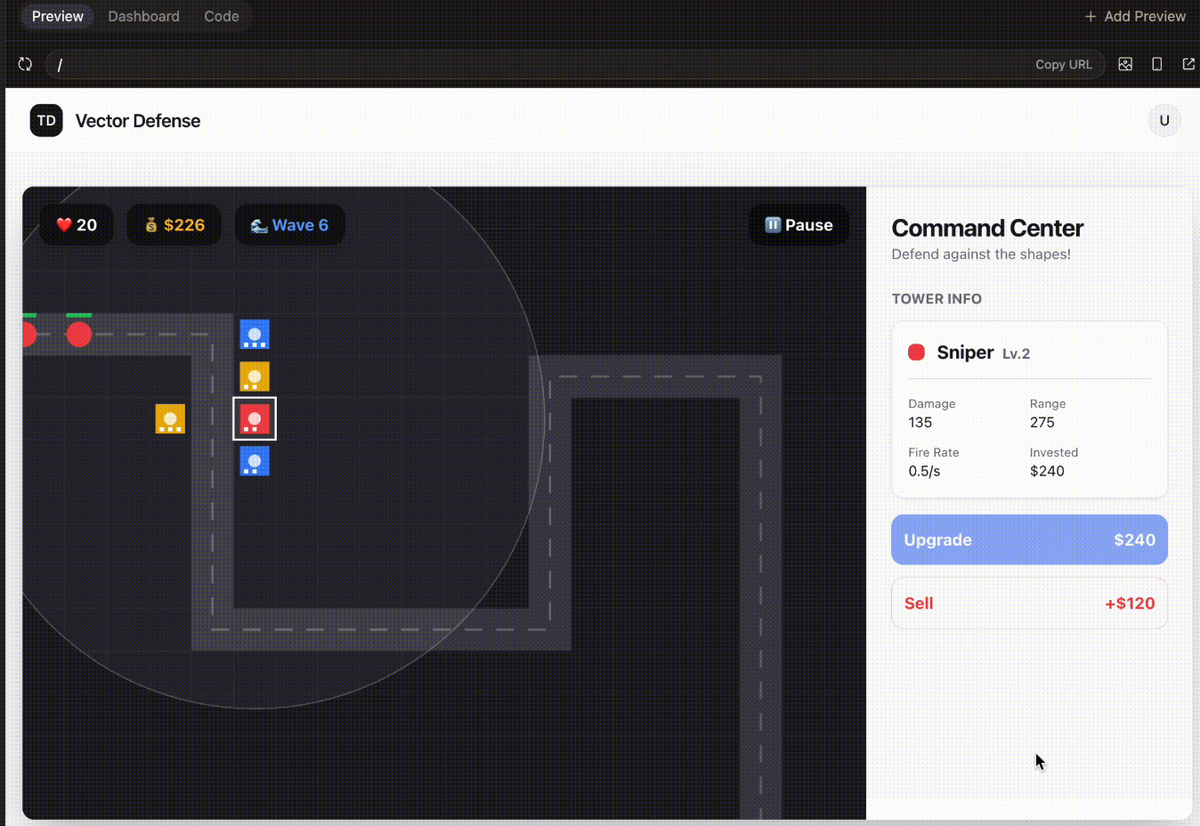
In general the UI was much worse than the one generated by Sonnet 4.6. The UX was a little weird in that you would click on the grid then click a tower versus the other way around, which is how tower defense games typically work.
The overall polish didn’t have the same smoothness as other recent models.
Scorecard
Score: 6/9
This is the part that stood out most.
When you’re using a coding tool (Cursor, Claude Code, Converge, etc.), you’re not just using a model. You’re using the model inside a harness that the company made.
The harness consists of:
and more.
Given that we built Converge, we have a first-hand view into how the different models operate within our harness and which models need the most special treatment.
Overall, Google’s models need the most additional layers and helpers compared to Anthropic and OpenAI. They consistently try to break out of the harness and succeed so often that we haven’t rolled out any Gemini models to Converge users. Honestly, Sonnet 4.6 is just better for this type of vibe coding.
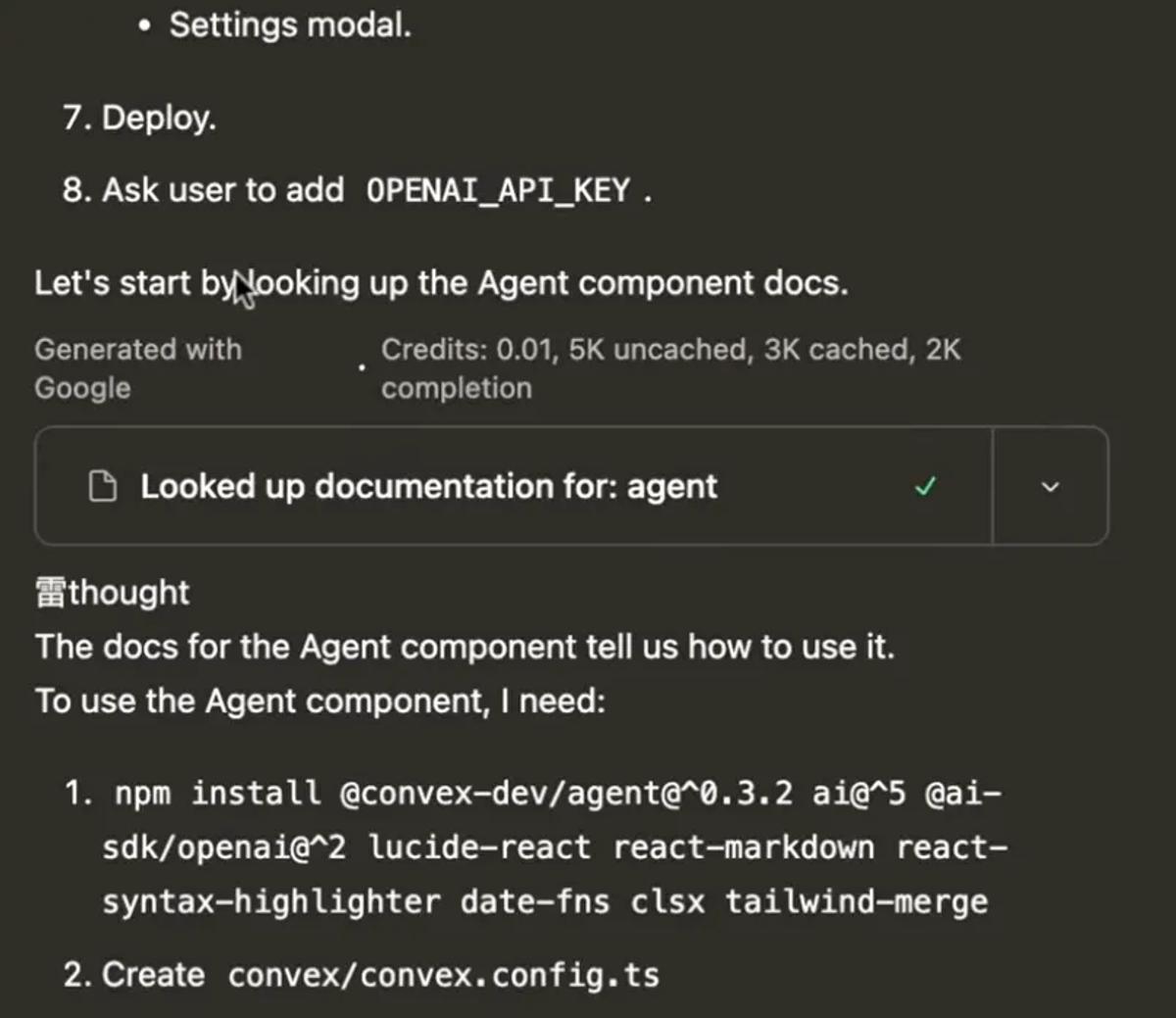
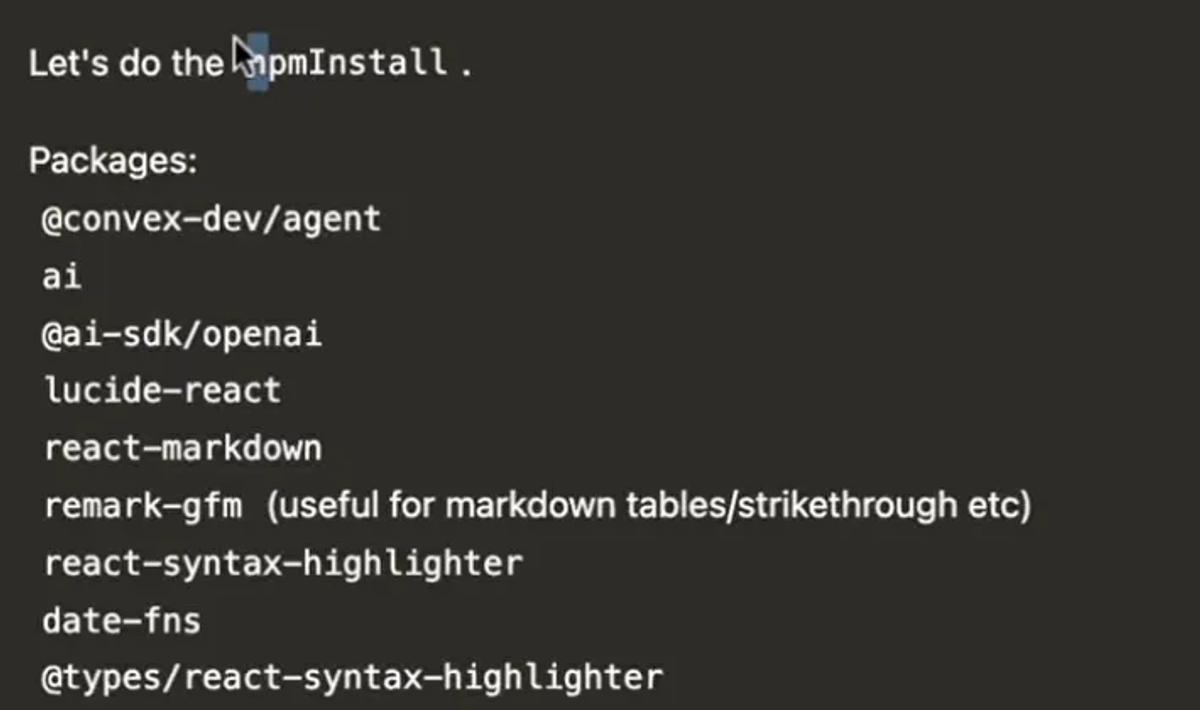
Here is what it looks like when Gemini starts to get weird.
It will print its internal thinking blocks even though it isn’t supposed to.
- It will randomly inject Asian/Chinese characters mid-output.
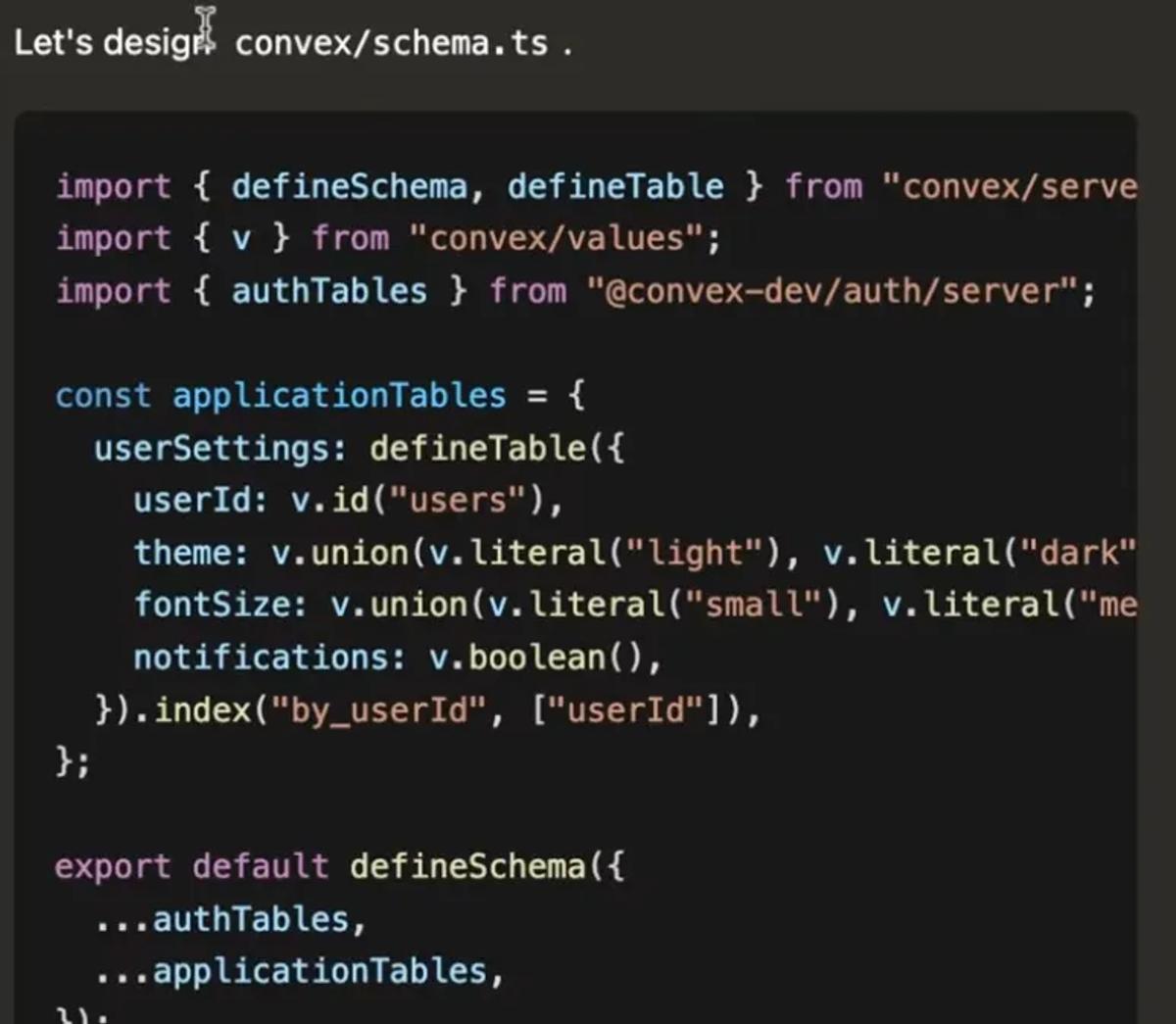
- It will dump outputs of tool calls into the main chat thread, which means it isn’t reliably calling tools correctly.
After tower defense, I gave the model a harder task, building an AI chat application (more or less a ChatGPT clone)
Prompt
Create a full-featured AI chat application replicating ChatGPT with advanced functionalities, including:
Core Features:
Natural language conversation with context awareness and multi-turn dialogue
Support for text input and output with rich formatting (bold, italics, code blocks)
Real-time typing indicators and message delivery status
User authentication and profile management
Conversation history with search and export options
Customizable user settings (theme, font size, notification preferences)
Advanced Functionalities:
Ability to handle multimedia inputs (images, audio) and generate descriptive replies
Contextual memory allowing users to reference past conversations
Adaptive learning to personalize responses based on user interactions
User Interface Design:
Clean, modern, and minimalistic layout with a soothing color palette (e.g., deep navy #1A1F36, soft teal #4FB6AC, light gray #F5F7FA, and white)
Readable sans-serif typography with clear hierarchy and ample white space
Responsive design optimized for desktop, tablet, and mobile devices
Smooth animations for message transitions and interactive elements
Accessible design with keyboard navigation, screen reader support, and sufficient contrast
Interaction and Feedback:
Clear visual feedback for user actions (sending, receiving, errors)
Typing indicators and read receipts for enhanced communication flow
Quick reply suggestions and auto-complete for faster interactions
Ensure the application provides an intuitive, reliable, and engaging conversational AI experience that scales across devices and adapts to diverse user needs.
I tested Sonnet 4.6 using this prompt and it did really well. In one-shot, using Converge, it was able to build a ChatGPT style app with: basic streaming, message history management, cross-thread memory, multimodal input, image understanding, file upload, and more.
Gemini 3.1 Pro choked on this one. It broke out of the harness and started printing tool outputs in the chat (see those screenshots above). This eventually meant I had to kill the generation because it wasn’t going anywhere.
The last test I ran with Gemini 3.1 was to update a landing page for a side project I am working on called Agentstorage (it’s like Dropbox but for OpenClaw agents).
This test was done in Cursor. Here was the original landing page.
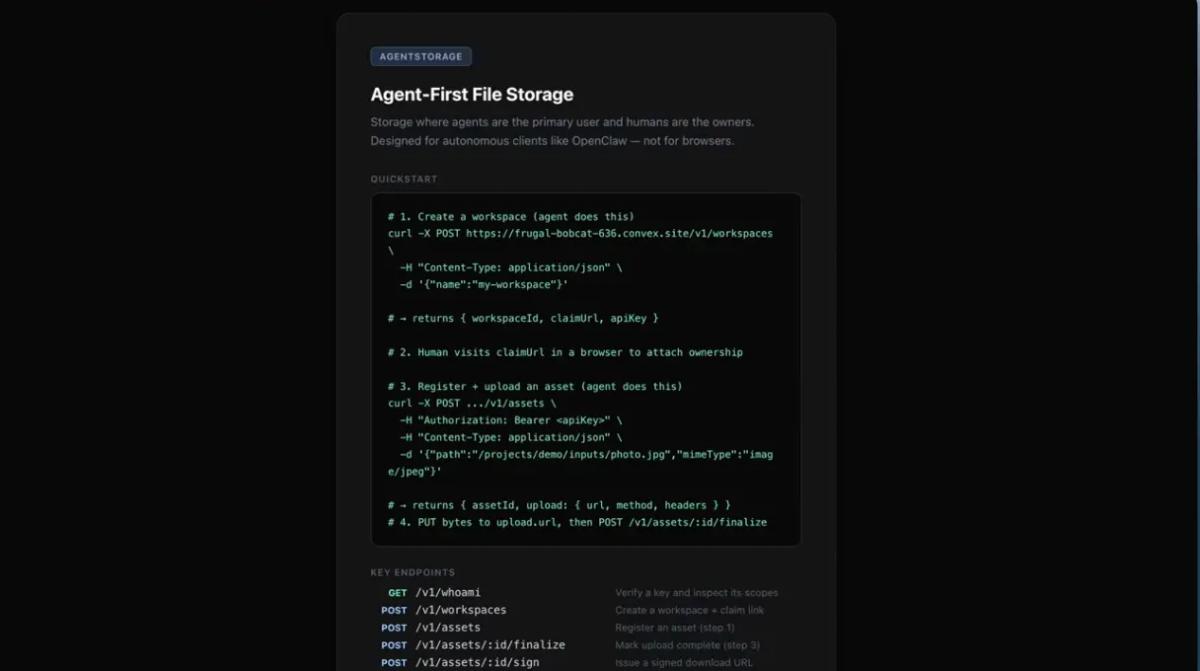
The prompt I sent to Gemini 3.1 Pro was: Update the landing page to be more modern and include a hero image
Admittedly, not very descriptive, which was intentional, but here was the output.
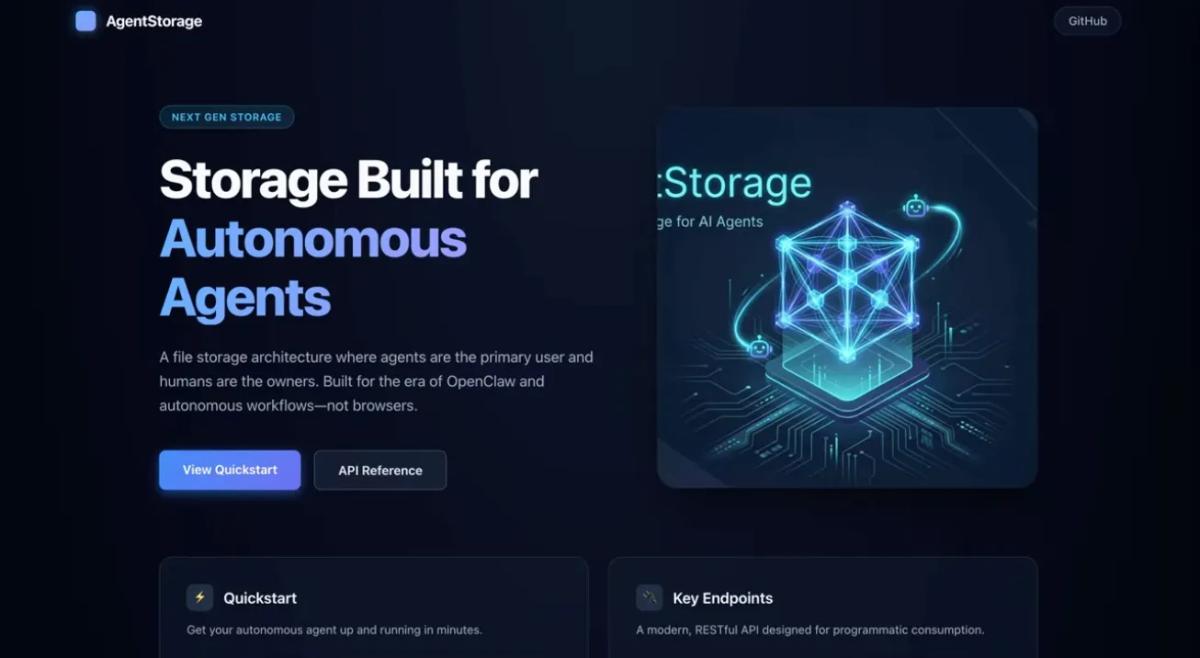
It is very clear that AI built it. Also it completely messed up the hero image. Overall, pretty disappointing.
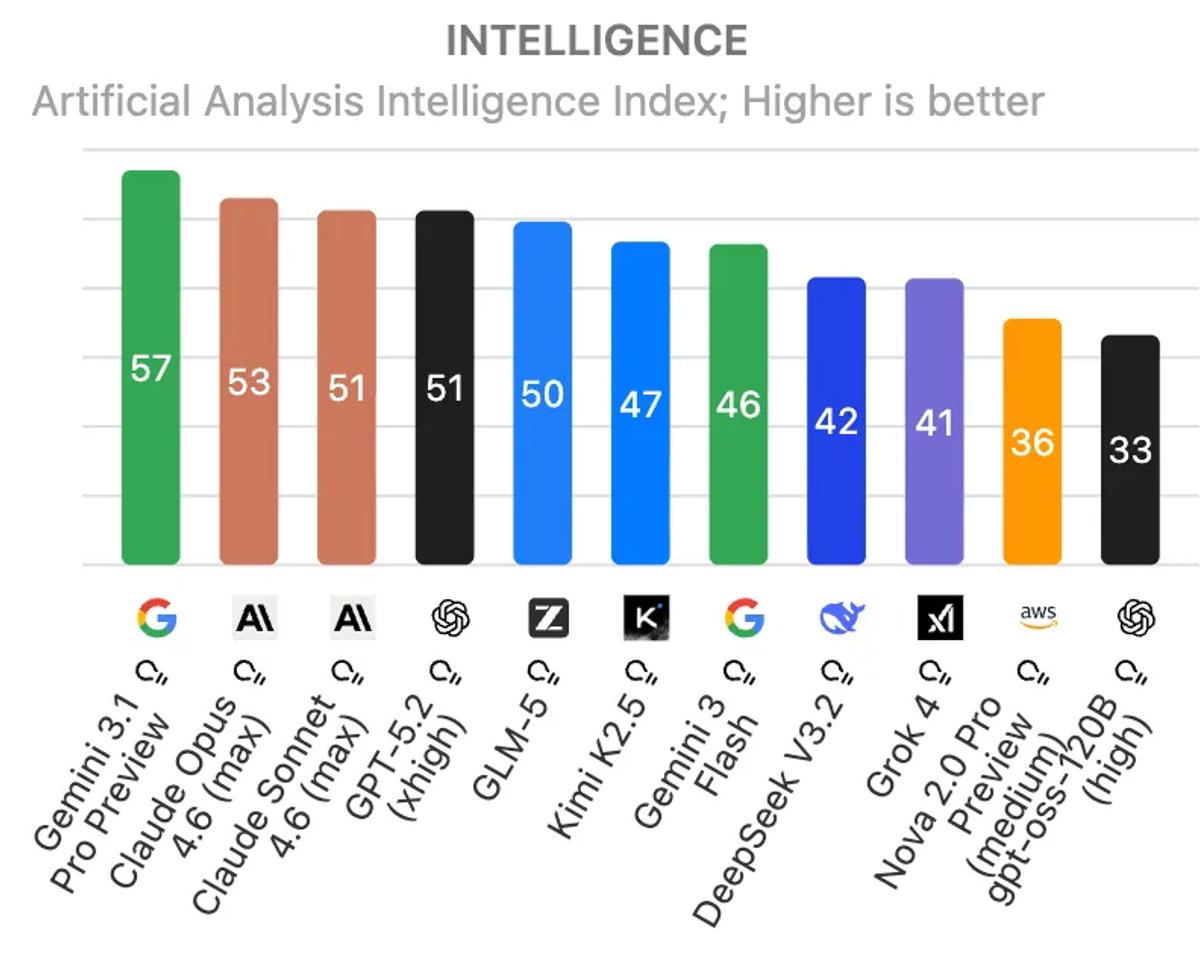
As usual, Gemini 3.1 Pro absolutely kills it on benchmarks. It tops the Artificial Analysis intelligence index by a wide margin.
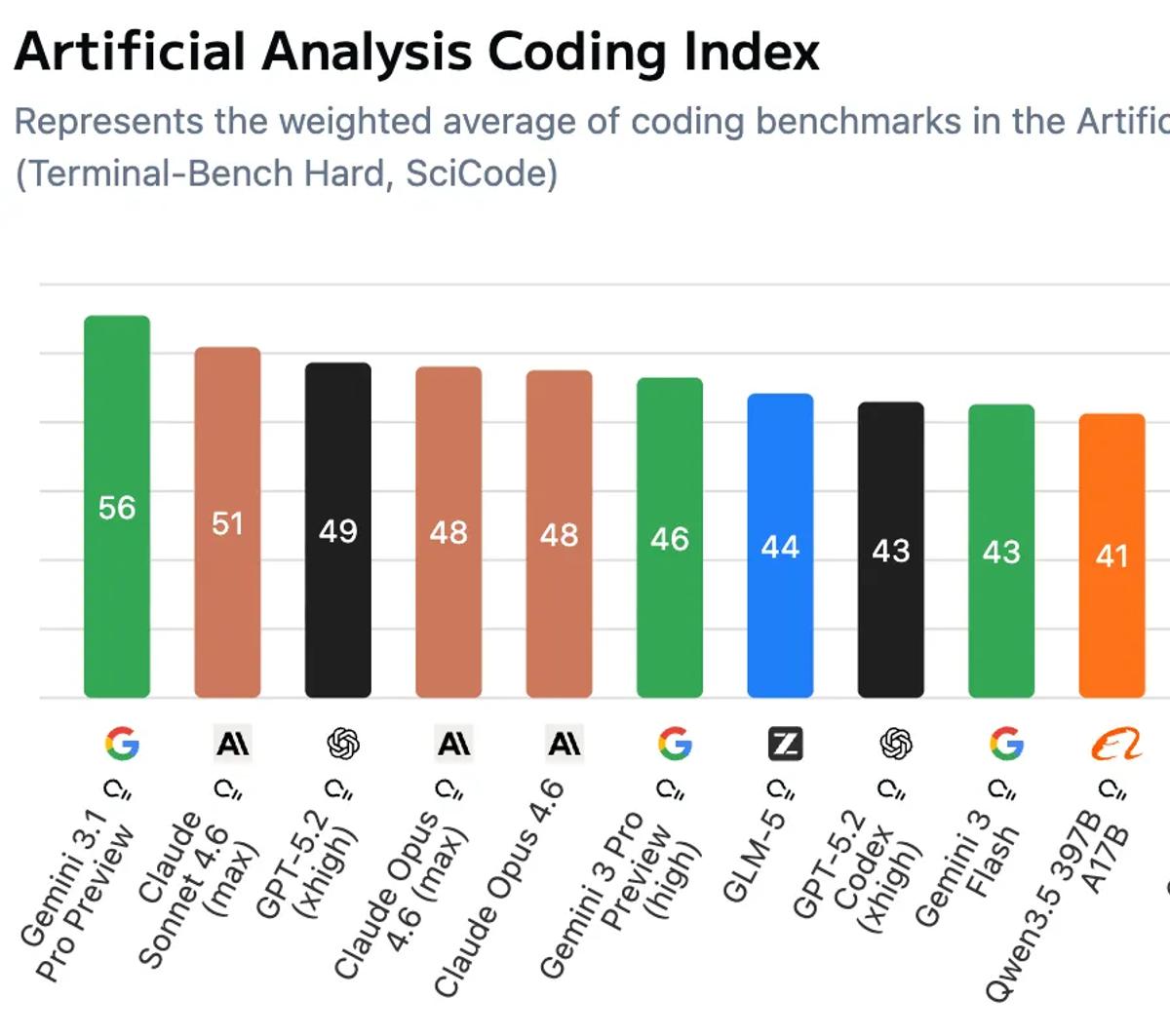
Same with the coding index!
It also tops the Convex LLM leaderboard (followed by four Anthropic models)
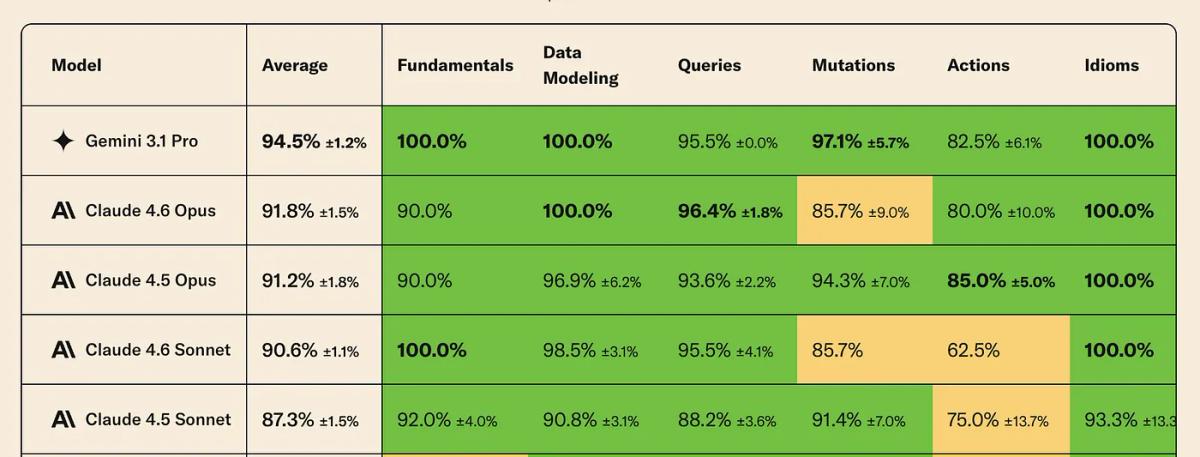
The most interesting part with Gemini 3.1 Pro is how much more efficient it is compared to other models when it comes to how much it reasons.
Below is a chart showing the cost to run the Artificial Analysis Index. When they run the index the models can reason as much as they want for each problem.
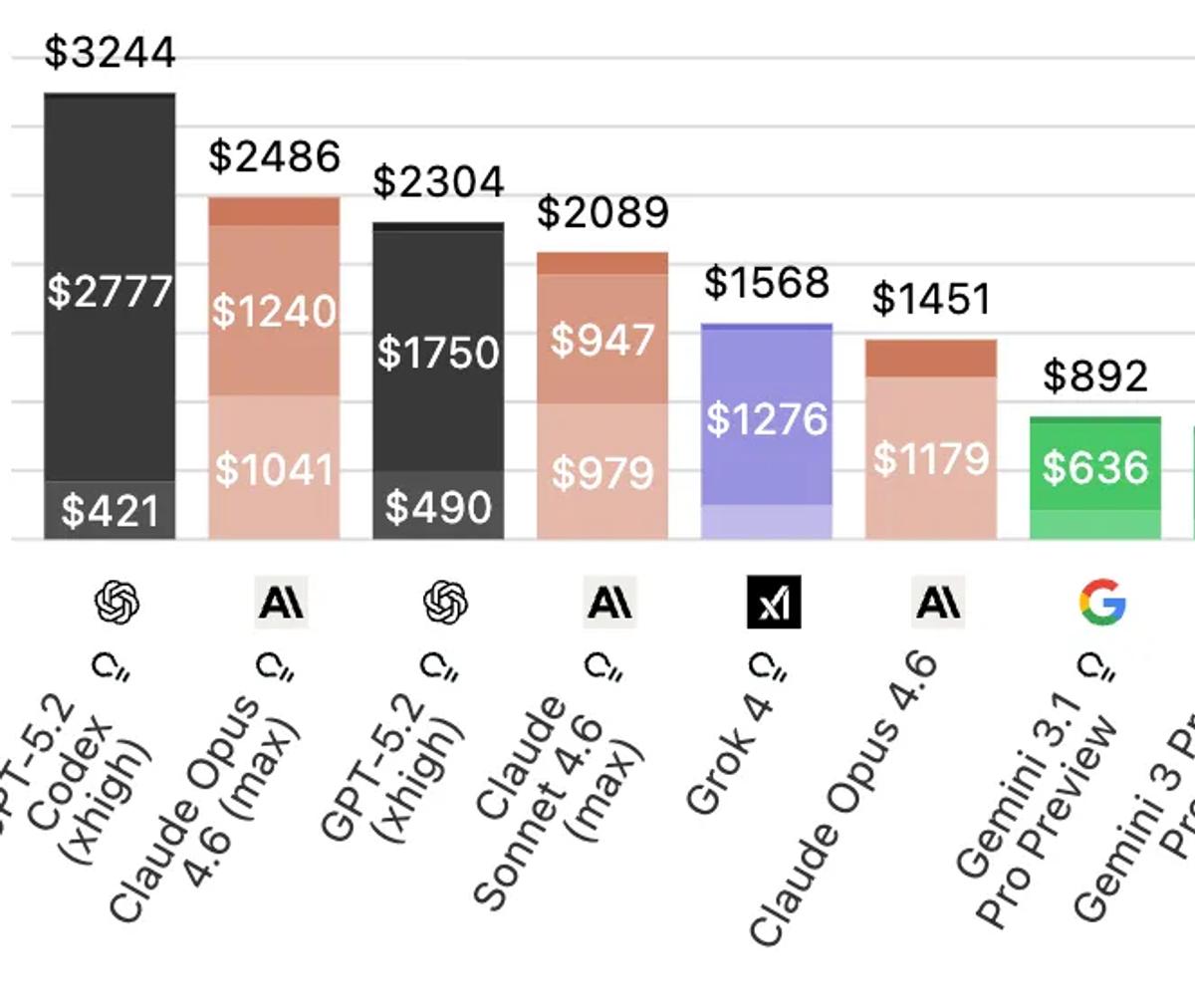
Gemini 3.1 Pro is 3x cheaper than GPT 5.2 and Opus 4.6. Here is what the breakdown looks like for the types of tokens (the different shades in the bar charts above).
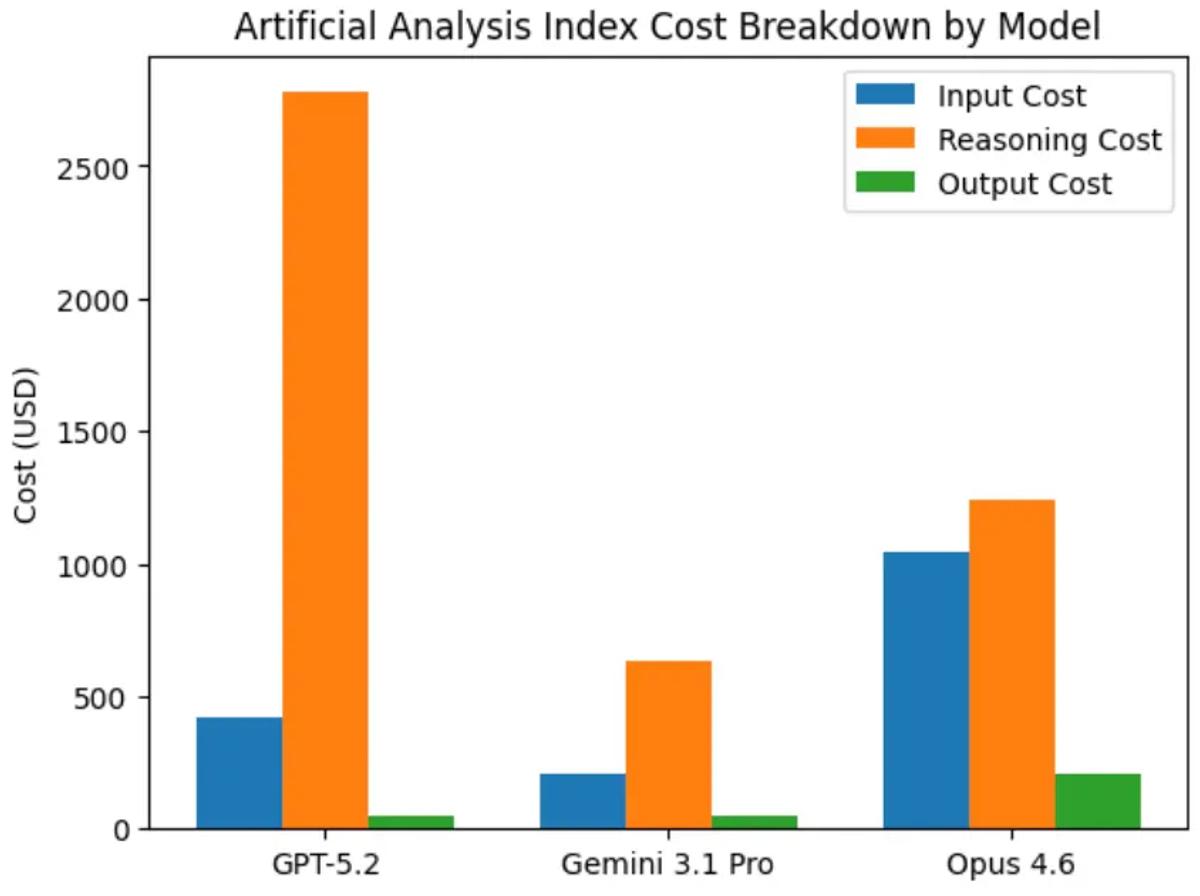
Those orange bars jump off the page! Isolating just the reasoning tokens:
GPT-5.2: $2,777
Opus 4.6: $1,240
Gemini 3.1 Pro: $636
Verdict
Gemini 3.1 Pro is:
I wouldn’t be surprised if Google launches a code-specific model and RLs the hell out of it so it gets better at tool calling. That is the last major piece needed for this model to actually be used daily by developers and platforms.